
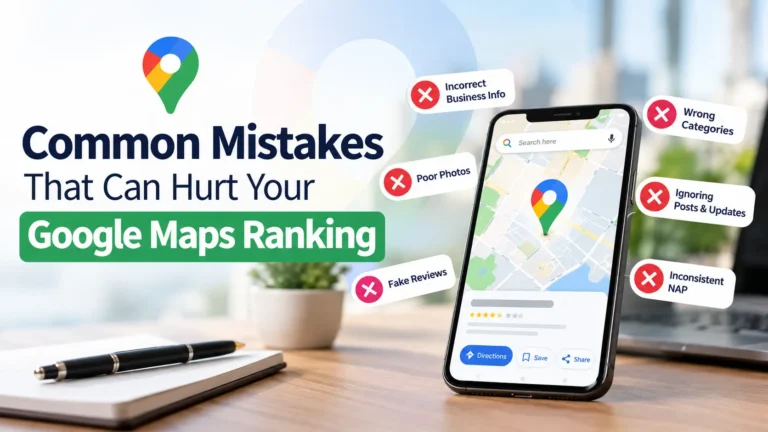
When people search for a nearby restaurant, repair shop, or other local service, they often turn to Google Maps to find a business they can trust. They may compare customer reviews, check opening hours, look at photos, or get directions before deciding where to go.
For local business owners, appearing prominently in Google Maps can help more potential customers discover their services. However, some businesses struggle to gain visibility even when they offer good products and customer service.
The problem may come from small mistakes in their business information, customer review management, or online presence.
Understanding these issues can help you identify what needs improvement and make it easier for customers to find and choose your business.
Let’s look at the common mistakes that can hurt your Google Maps visibility and how to avoid them.
1. Providing Incomplete Business Information
One of the most common mistakes is leaving important details missing from your Google Business Profile. Customers need accurate information to understand what your business offers, where it is located, and when they can visit.
For example, a customer searching for a nearby dental clinic may skip a listing that has no phone number, unclear opening hours, or an incomplete address.
Make sure your profile includes:
- Your correct business name and address.
- An accurate phone number and website.
- Regular opening hours and holiday hours.
- Relevant business categories.
- A clear description of your products or services.
Review these details whenever your business changes its location, contact information, or operating schedule.
Keeping your information complete and accurate helps customers make informed decisions and supports a reliable business presence on Google.
2. Choosing the Wrong Business Category
Your business category helps Google understand what your business does and which searches may be relevant to it. Choosing an inaccurate category can make it harder for your business to appear for the right searches.
For example, a company that primarily provides plumbing services should not select a general home improvement category if a more specific, accurate option is available.
Choose the category that best describes your main business activity. You can add relevant secondary categories when they genuinely represent other services you provide.
Avoid selecting unrelated categories simply because you want to appear in more searches. Your categories should reflect what customers can actually expect from your business.
3. Adding Keywords to Your Business Name
Some business owners add service names, city names, or promotional phrases to their Google Business Profile name in an attempt to improve visibility.
For example, a business officially named “Green Valley Plumbing” might change its listing name to “Green Valley Plumbing – best plumber service near me.”
If those additional words are not part of the business’s real-world name, this approach can violate Google’s business representation guidelines and may lead to profile restrictions or suspension.
Use the name customers recognize from your storefront, website, signage, and other real-world materials. Describe your services and service area in the appropriate profile fields instead.
An accurate business name helps establish trust and reduces the risk of unnecessary profile problems.
4. Ignoring Customer Reviews
Customer reviews can influence how people perceive your business and whether they decide to contact you.
A profile with unanswered questions or unresolved complaints may leave potential customers uncertain about the quality of your service.
You do not need to respond to every review with a long message. A short, thoughtful response is often enough.
For positive reviews, thank customers for sharing their experiences. For negative reviews, acknowledge the concern, remain professional, and offer a suitable way to resolve the issue.
You can also encourage genuine customers to leave honest feedback after using your services. Never buy reviews, offer rewards in exchange for positive ratings, or pressure customers to remove negative feedback.
Although responding to reviews does not guarantee higher rankings, it helps demonstrate that you value customer feedback and take your reputation seriously.
5. Leaving Out Useful Business Photos
Photos help potential customers understand what your business looks like before they visit. Without them, people may have difficulty recognizing your storefront, evaluating your facilities, or understanding what you offer.
For example, a restaurant can upload photos of its dining area and dishes, while a car repair shop can show its workshop and service facilities.
Consider adding genuine photos of:
- Your storefront and entrance.
- Your team and workplace.
- Your products or completed projects.
- Your facilities and customer areas.
- Other relevant aspects of your business.
Use clear, recent images that accurately represent your business. Avoid misleading photos or images that have little connection to your services.
Photos alone will not guarantee better rankings, but they can help customers feel more confident about choosing your business.
6. Allowing Business Information to Become Outdated
Business information can change over time. You might extend your opening hours, introduce new services, change your phone number, or move to another location.
If your online profile still displays old information, customers may arrive when you are closed or contact a number that no longer works.
These experiences can create frustration and damage customer trust.
Set a regular reminder to review your profile. Check your opening hours before holidays, confirm that your website and phone number work correctly, and update your information whenever something changes.
If your business relocates, follow Google’s process for updating your address. Make sure your new location information is accurate and consistent wherever customers are likely to find it.
7. Creating Multiple Profiles for the Same Business
Some business owners create several Google Business Profiles for one location because they believe more listings will bring more customers.
However, duplicate profiles can confuse customers and divide attention between listings. They can also create problems when Google identifies profiles that represent the same business at the same location.
Generally, one eligible business should have one profile for each genuine business location. Separate profiles may be appropriate for distinct, eligible locations, but they should not be created simply to target different keywords or neighborhoods.
If you discover duplicate listings, review Google’s guidance and use the appropriate process to resolve them. Avoid creating additional profiles unless your business genuinely qualifies for them.
8. Neglecting Your Website
Your Google Business Profile is important, but your website can also help customers understand your business and services.
A website that loads slowly, displays outdated contact details, or provides little information about your services may leave visitors with unanswered questions.
Make sure your website clearly explains what you offer, where you operate, and how customers can contact you. Check that it works well on mobile devices, since many local searches happen on smartphones.
If you serve several locations, provide useful information about each location rather than publishing multiple pages with nearly identical content.
Your website and business profile should provide consistent, accurate information. This creates a better experience for visitors and helps Google understand your business.
9. Using an Incorrect Address or Service Area
Businesses sometimes display an address where they do not actually operate or select service areas that do not reflect where they can serve customers.
This can create problems for both customers and business owners.
If customers visit your location, use an accurate address for your eligible business location. If you travel to customers and operate as a service-area business, follow Google’s rules for displaying your address and defining your service area.
For example, a plumber who visits customers at their homes may need a service-area profile rather than a publicly displayed residential address.
Select service areas based on where you genuinely provide services. Adding distant cities simply to attract more searches does not guarantee visibility in those areas.
10. Expecting Immediate Results
Another common mistake is expecting a major improvement in Google Maps rankings immediately after updating a profile.
Local search visibility depends on several factors, including relevance, distance, and prominence. The location of the person searching can make a significant difference, so a business may appear prominently for someone nearby but less prominently for someone farther away.
Instead of making frequent changes in the hope of an instant result, focus on maintaining accurate information, earning genuine reviews, improving your website, and providing a good customer experience.
Track meaningful outcomes, such as phone calls, website visits, direction requests, and customer inquiries. Review your Google Business Profile performance over time to understand whether your improvements are helping.
Remember that no particular optimization guarantees a specific ranking or position.
How to Keep Your Google Maps Presence Healthy
You do not need to make every possible change at once. Start with the issues that could create the biggest problems for your customers.
Use this simple checklist:
- Confirm that your business name, address, and phone number are accurate.
- Review your primary and secondary business categories.
- Complete the relevant sections of your business profile.
- Check opening hours and holiday schedules.
- Add recent, genuine photos.
- Respond professionally to customer reviews.
- Look for duplicate profiles.
- Verify that your website works well on mobile devices.
- Ensure your address and service areas follow Google’s guidelines.
- Monitor profile performance and customer inquiries.
Make these checks part of your regular business routine instead of waiting until your visibility drops.
Final Thoughts
Improving your presence on Google Maps starts with giving customers accurate information and making your business easy to understand and trust. Incomplete details, incorrect categories, misleading business names, neglected reviews, and outdated information can all create avoidable problems.
Focus on maintaining a reliable business profile, responding to customers, keeping your website useful, and following Google’s guidelines. These actions will not guarantee a top position, but they can help build a stronger local presence and make it easier for potential customers to choose your business.
Rather than looking for shortcuts, concentrate on the things that genuinely help customers. A consistent, trustworthy online presence is a much better long-term approach than trying to manipulate rankings.
Frequently Asked Questions
Can negative reviews hurt my Google Maps ranking?
Negative reviews can influence how potential customers view your business. Google’s local ranking systems consider multiple factors, and review ratings and review count can contribute to prominence. However, one negative review does not automatically cause a ranking drop.
How often should I update my Google Business Profile?
Review your profile regularly and update it whenever important information changes. Check opening hours before holidays, keep contact details current, and add new photos or relevant business information when appropriate.
Do photos help improve Google Maps rankings?
Photos help customers understand your business and may influence their decision to visit or contact you. However, adding photos alone does not guarantee higher rankings.
Why does my business appear on Google Maps in one area but not another?
Distance is one of the main factors in local search results. Your business may appear more prominently to people searching nearby than to people searching farther away. Relevance and prominence also influence results.
Can I add my city name to my Google Business Profile name?
Only include your city name if it is genuinely part of your real-world business name. Adding location keywords solely to influence rankings can violate Google’s guidelines.